PDF form guide

How to Fill Out Form DS-11 Online

Use this visual DS-11 guide to prepare the U.S. passport application PDF, understand which fields belong on each page, and avoid the most important mistake: do not sign until the acceptance agent tells you to sign.

This page explains how to fill a PDF visually. It is not legal advice or passport eligibility advice. DS-11 is generally submitted in person with supporting documents, photo, and fees.

Official source

U.S. Department of State Form DS-11, Application for a U.S. Passport.

Official DS-11 PDF
Travel.State.Gov passport forms
Travel.State.Gov apply in person
Field-by-field map

Click a numbered marker for each DS-11 field group.

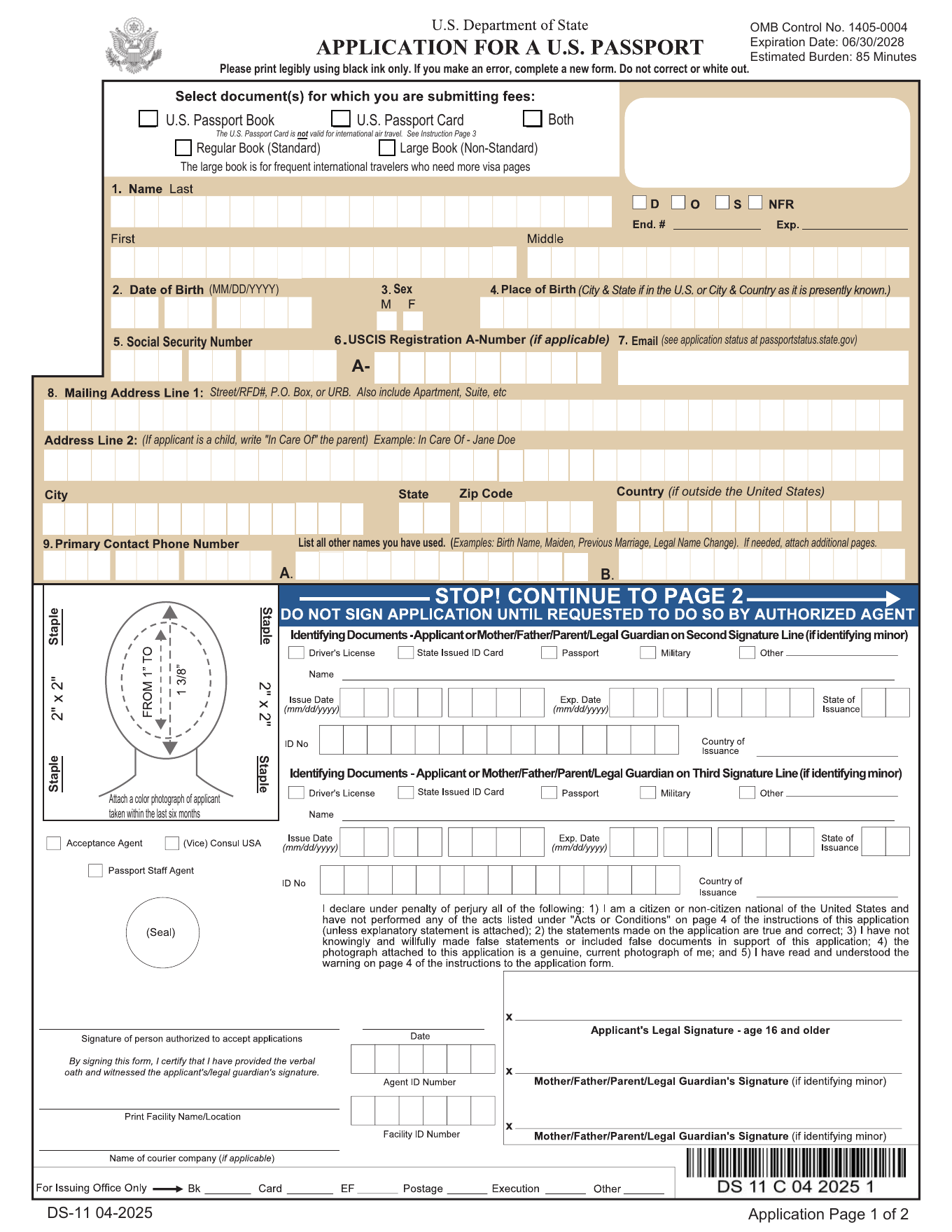
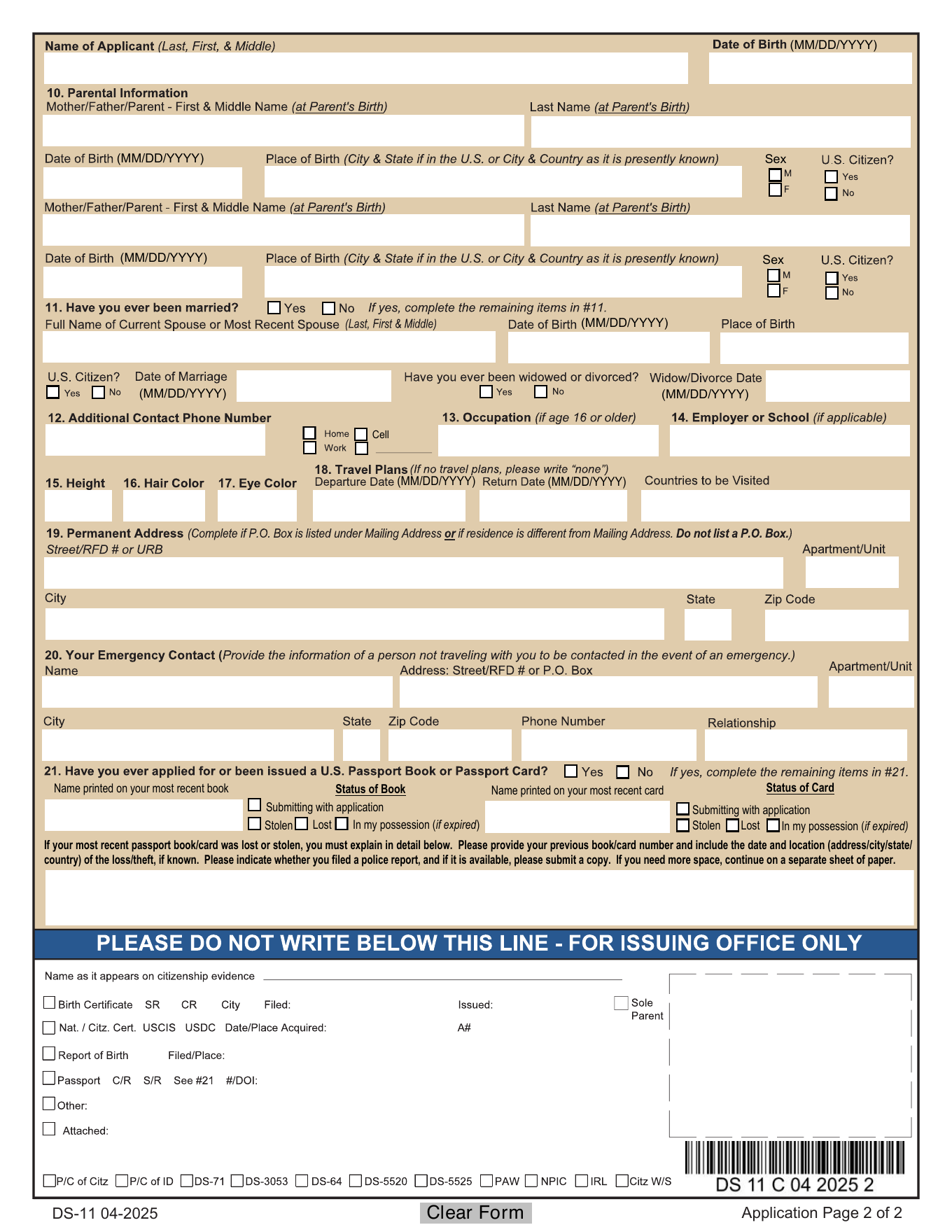
The official DS-11 PDF has instructions plus two application pages. These previews map the fillable areas on pages 5 and 6, where most applicants enter information.

DS-11 page 5 - applicant and mailing information
DS-11 page 5 with numbered filling guide markers 1 2 3 4 5 6 7 8 9 10 23 24
DS-11 page 6 - parents, contact, travel, and prior passport information
3

Date of birth

Enter month, day, and year of birth in the date boxes shown on the form.

Use the applicant date of birth, not the date you fill or print the form.

Official DS-11 PDF
6

SSN, alien number, and email

Enter the Social Security number if you have one, and use the alien number and email fields only when they apply to the applicant.

The DS-11 instructions treat SSN as sensitive and required when applicable. Do not leave sensitive information in an unsecured file.

Common question: can you type the form online and handwrite SSN later? One video walkthrough warns not to mix typed and handwritten entries casually; use the official form instructions and acceptance facility guidance.

Official DS-11 PDFYouTube DS-11 guide: Social Security number at 1:45
8

Mailing city, state, ZIP, and country

Complete the city, state, ZIP code, and country fields for the mailing address.

Keep these fields consistent with the mailing street address above.

Official DS-11 PDF
9

Applicant phone number

Enter the applicant phone number in the segmented phone fields.

Use a number where the passport agency or acceptance facility can reach you about the application.

Official DS-11 PDF
10

Other names used

List other names you have used, such as former legal names or names used on prior records, when applicable.

Leave this area blank only when no other names apply under the current instructions.

Official DS-11 PDF
11

Applicant name and date of birth header

Repeat the applicant name and date of birth at the top of the second application page.

Keep this consistent with the name and date of birth entered on page 5.

Official DS-11 PDF
12

Parent 1 information

Enter Parent 1 first/middle name, last name, date of birth, place of birth, sex marker, and U.S. citizen answer as requested.

Use parent names and facts carefully; passport applications often compare these details to citizenship evidence and identity records.

Official DS-11 PDF
13

Parent 2 information

Enter Parent 2 first/middle name, last name, date of birth, place of birth, sex marker, and U.S. citizen answer when applicable.

If a parent field does not apply, follow the official DS-11 instructions rather than inventing an entry.

Official DS-11 PDF
14

Marriage and spouse information

Answer whether you have ever been married, then enter current or most recent spouse details only when they apply.

Use the current or most recent spouse fields only for the applicant spouse information requested by the form.

Official DS-11 PDF
15

Additional phone, occupation, employer or school

Enter additional contact phone numbers, occupation, and employer or school information.

If retired, a student, self-employed, or not currently employed, follow the form and acceptance facility guidance for the wording to use.

Official DS-11 PDFYouTube DS-11 guide: occupation and school at 2:38
17

Travel plans

Enter departure date, return date, and countries to be visited if you have travel plans.

If you do not have travel plans, follow the form instructions or write an appropriate non-applicable entry only if the official process allows it.

Official DS-11 PDF
20

Most recent passport book or card

If you have had a U.S. passport book or card, enter the name printed on it and mark whether it is being submitted, stolen, lost, or in your possession.

Use the book and card sections separately. Do not mark lost or stolen unless that is actually the status.

Official DS-11 PDF
21

Lost or stolen circumstances

If a passport book or card was lost or stolen, use the circumstances box to explain what happened.

Complete this only when the lost or stolen status applies.

Official DS-11 PDF
23

Bring photo, proof, ID, photocopies, and fees

DS-11 filling is only one part of the passport process. Prepare a compliant passport photo, proof of citizenship, photo ID, photocopies, and correct fees for the appointment.

Use Travel.State.Gov for photo, document, and fee rules because those requirements can change.

Common question: is filling the PDF enough to get a passport? No. DS-11 usually requires in-person submission with supporting documents and fees.

Travel.State.Gov apply in personTravel.State.Gov passport photosTravel.State.Gov passport feesYouTube passport guide: citizenship, ID, fees, photocopies at 2:46YouTube passport guide: 2x2 photo at 2:31
24

Acceptance agent area - do not pre-fill

This lower DS-11 area is used at the passport acceptance appointment for agent review, identifying documents, photo handling, witnessed signatures, and office processing.

As the applicant, do not fill this area before the appointment unless the acceptance agent or facility specifically instructs you to do so.

Common question: should I type the identifying document and agent boxes myself? Usually no. Complete your applicant sections first and wait for the authorized agent.

Official DS-11 PDFTravel.State.Gov apply in person

Before you fill DS-11 online

Use the official PDF

Start from the current DS-11 PDF or the copy supplied by an official passport acceptance process.

Prepare supporting items

Filling DS-11 is not the whole passport process. Check official photo, citizenship evidence, ID, photocopy, and fee requirements.

Do not sign early

Fill the fields first, but wait to sign until the acceptance agent instructs you at the appointment.

DS-11 passport book, card, photo, documents, and fees

The DS-11 form asks what passport product you want, but the appointment process also requires supporting documents. Use Travel.State.Gov for current photo, evidence, ID, photocopy, and fee requirements.

Passport book or card

Select the product you need before calculating fees. The passport card has limited travel use compared with the book.

Photo and proof

Bring a compliant passport photo and official proof of U.S. citizenship or nationality as required by the passport process.

Fees

Fees can vary by product, applicant age, and service choice. Confirm the current fee before your appointment.

Ready to fill the PDF?

Open the standard DS-11 and fill the application fields.

PDFFRAME opens the regular PDF editor, so you can complete the official fillable DS-11 PDF and keep the guide visible while you work.

Fill standard DS-11

DS-11 PDF filling FAQ

Can I fill out DS-11 online?

You can fill the PDF fields online and print the form, but DS-11 is generally submitted in person. Do not sign until the acceptance agent tells you to sign.

Do I sign DS-11 before my passport appointment?

No. Wait until the acceptance agent instructs you to sign because the signature must be witnessed.

Is DS-11 for renewal?

DS-11 is commonly used for first-time applicants, children, and applicants who cannot use the renewal form. Use Travel.State.Gov to confirm the correct form.

What should I bring with DS-11?

Use Travel.State.Gov requirements for proof of citizenship, photo ID, photocopies, passport photo, and fees.