PDF form guide

How to Fill Out Form 1040 Online

Use this visual guide to understand the main Form 1040 PDF field groups, then open the official IRS 1040 in PDFFRAME and keep the guide beside the fillable fields while you work.

This page is a visual PDF filling guide, not tax advice. Use current IRS instructions, tax software, or a qualified tax professional for filing decisions and calculations.

Official source

IRS Form 1040, U.S. Individual Income Tax Return, 2025.

IRS About Form 1040
IRS Form 1040 PDF
IRS 1040 Instructions
Field-by-field map

Click a numbered marker for each Form 1040 field group.

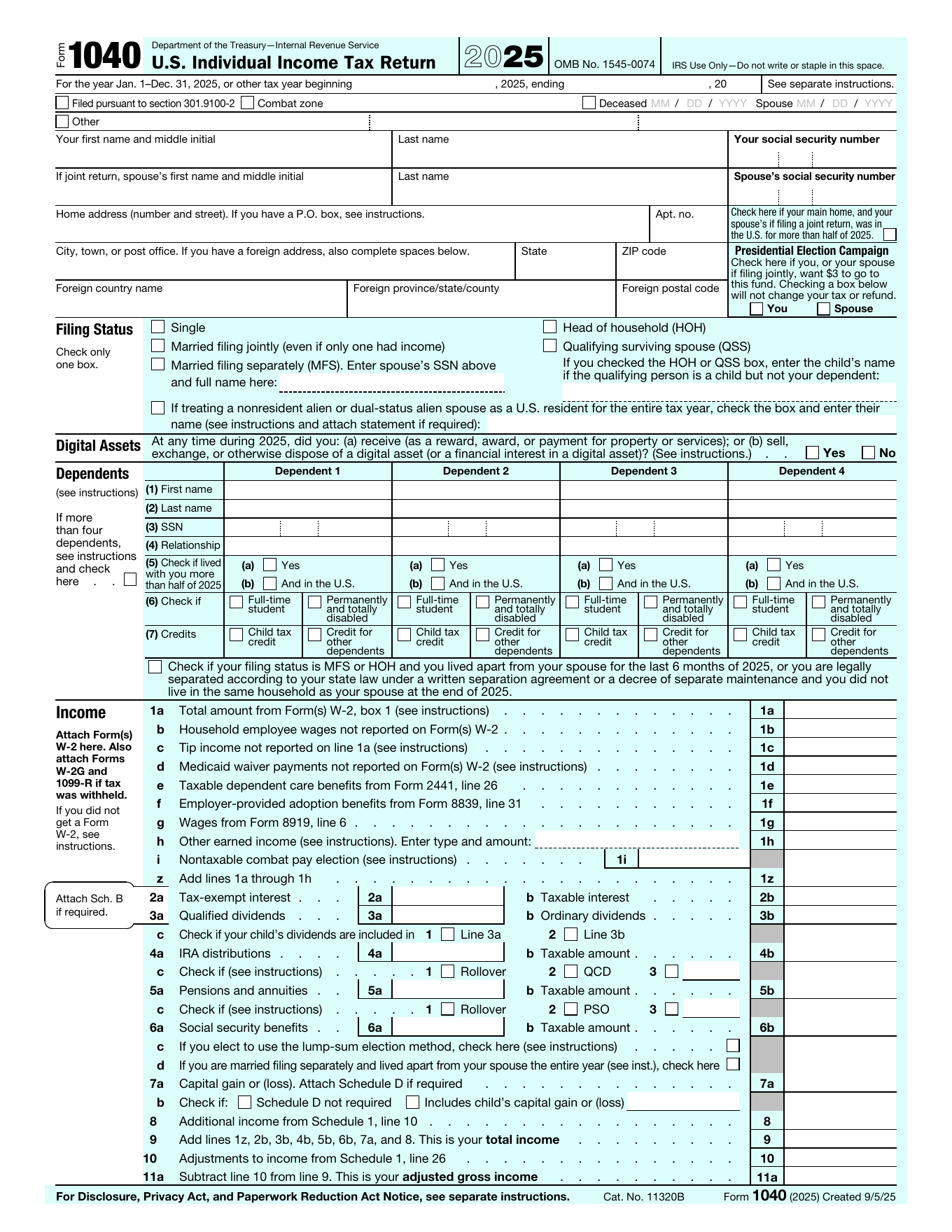
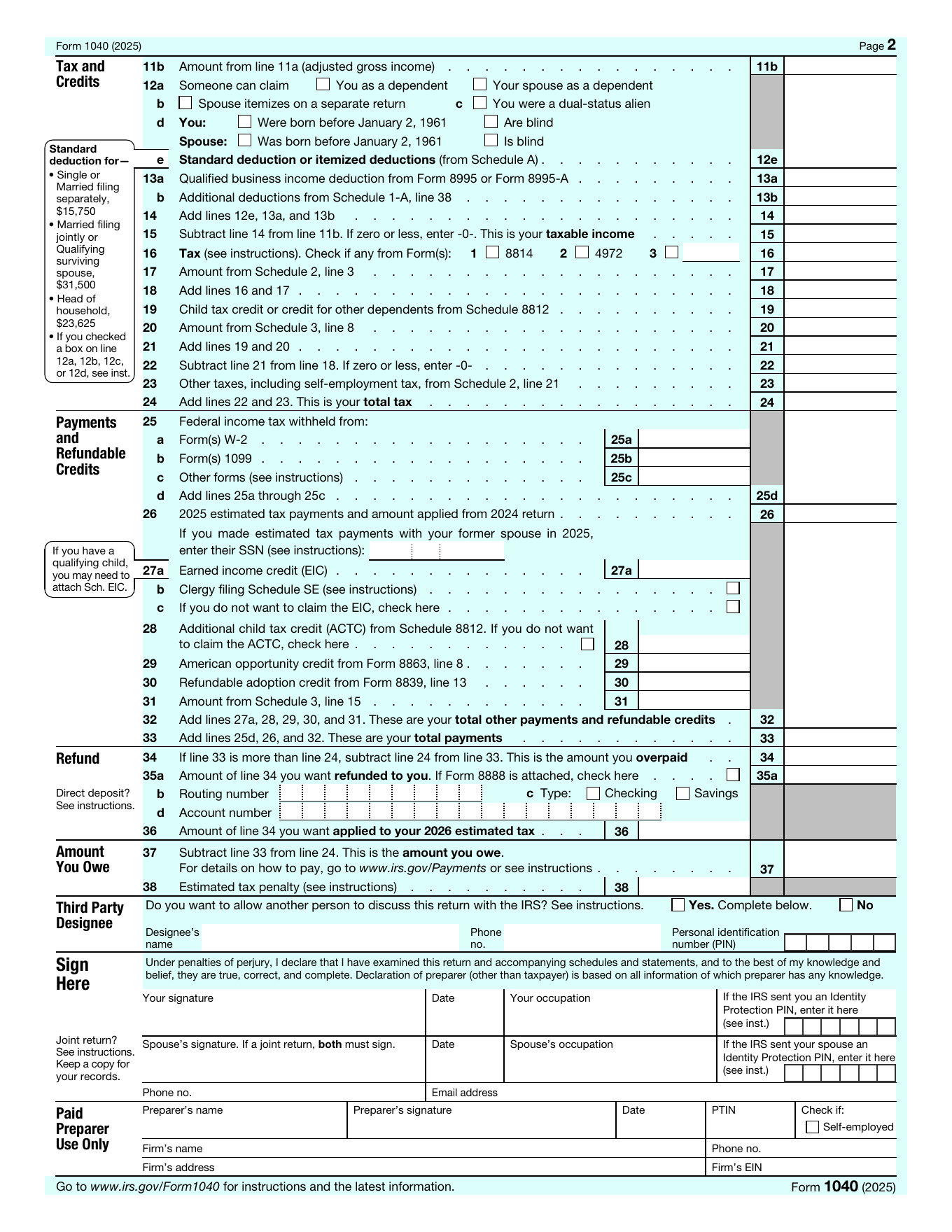
The official Form 1040 PDF has two pages and many linked schedules. These markers group the fillable PDF fields so you can see what belongs where before entering your own tax information.

Form 1040 page 1 - personal information, dependents, and income
IRS Form 1040 page 1 with numbered filling guide markers 1 2 3 4 5 6 7 8 9 10 11 12
Form 1040 page 2 - deductions, tax, payments, refund, amount owed, and signatures
1

Tax year and top filing flags

Use the top boxes only when the Form 1040 PDF asks for a tax year or a special filing flag such as deceased taxpayer, spouse, or qualifying combat zone information.

Do not invent a top-of-form entry. Use these fields only when your filing situation or IRS instructions call for them.

IRS Form 1040 PDFIRS Instructions for Forms 1040 and 1040-SR
3

Home address and foreign address

Enter the mailing address, apartment number when applicable, city, state, ZIP code, and foreign address fields only if the address is outside the United States.

Use the address where IRS notices should reach you, and keep foreign country/province/postal fields blank unless they apply.

IRS Form 1040 PDFIRS Instructions for Forms 1040 and 1040-SR
4

Main home and Presidential Election Campaign

Answer the main-home question and the Presidential Election Campaign checkboxes only as the official form asks.

The campaign checkbox does not change your tax or refund, but it should still reflect your choice.

IRS Form 1040 PDFIRS Instructions for Forms 1040 and 1040-SR
6

Filing status detail fields

Use the spouse, nonresident alien, dual-status alien, separated, or qualifying child name fields only when they apply to the filing status you selected.

These are conditional fields. If the situation does not apply, leave the related field blank.

IRS Form 1040 PDFIRS Instructions for Forms 1040 and 1040-SR
8

Dependents table

Enter each dependent name, Social Security number, relationship, residency/student/disability answers, and credit checkbox only when you are claiming that dependent.

If you have more dependents than the table allows, follow the IRS instructions for additional dependents.

IRS Form 1040 PDFIRS Instructions for Forms 1040 and 1040-SR
9

Lines 1a-1z - wages and earned income

Report wages, household employee wages, tips, Medicaid waiver payments, dependent care benefits, employer adoption benefits, Form 8919 wages, other earned income, combat pay election, and the line 1z total as the form requests.

Use wage and income documents such as W-2s and related forms. The walkthrough notes that some income may be reported on one line and adjusted elsewhere instead of ignored.

IRS Form 1040 PDFIRS Instructions for Forms 1040 and 1040-SRYouTube Form 1040 walkthrough: income section at 0:03YouTube Form 1040 walkthrough: line 1A wages at 2:42
11

Lines 4-6 - IRA, pensions, annuities, and Social Security

Enter gross distribution amounts and taxable amounts for IRA distributions, pensions, annuities, and Social Security benefits, plus related checkboxes and explanation fields when they apply.

Gross and taxable amounts can differ. Use the IRS worksheets, related forms, or tax software instead of guessing taxable amounts.

IRS Form 1040 PDFIRS Instructions for Forms 1040 and 1040-SRYouTube Form 1040 walkthrough: IRA distributions at 13:30YouTube Form 1040 walkthrough: Social Security benefits at 17:51
12

Lines 7-11a - capital gain, Schedule 1, total income, adjustments, and AGI

Enter capital gain or loss, Schedule 1 additional income, total income, Schedule 1 adjustments, and adjusted gross income as the form and schedules calculate them.

Schedule 1 has both additional income and adjustments to income. Do not combine them into the wrong 1040 line.

Common question: can I type only the final total and ignore schedules? If a line says Schedule 1, Schedule D, or another form applies, prepare and attach the required schedule rather than only typing a final number.

IRS About Form 1040IRS Form 1040 PDFIRS Instructions for Forms 1040 and 1040-SRYouTube Form 1040 walkthrough: Schedule 1 income and adjustments at 21:03
13

Lines 11b-15 - deductions and taxable income

Carry adjusted gross income to page 2, answer the standard deduction checkboxes, enter deductions, qualified business income deduction, total deductions, and taxable income.

Use the standard deduction or itemized deductions according to IRS instructions. This guide shows where the fields are, not which deduction is best.

IRS Form 1040 PDFIRS Instructions for Forms 1040 and 1040-SRTurboTax Form 1040 overview
15

Lines 25-33 - withholding, estimated payments, refundable credits, and total payments

Enter withholding from Forms W-2 and 1099, estimated tax payments, refundable credits, Schedule 3 payments, and total payments.

Use payer forms and payment records. If a credit line does not apply, leave it blank rather than entering an unsupported number.

IRS Form 1040 PDFIRS Instructions for Forms 1040 and 1040-SRTurboTax Form 1040 overview
16

Lines 34-36 - refund and direct deposit

Enter refund amount, amount to be applied to estimated tax, routing number, account type, account number, and any Form 8888 checkbox when applicable.

Bank routing and account numbers are sensitive. Check them carefully before filing because a typo can delay or misdirect a refund.

IRS Form 1040 PDFIRS Instructions for Forms 1040 and 1040-SR
17

Lines 37-38 - amount you owe and estimated tax penalty

Enter the amount owed and any estimated tax penalty only after the return calculations show those amounts.

Use IRS payment instructions or tax software for payment method and penalty calculation decisions.

IRS Form 1040 PDFIRS Instructions for Forms 1040 and 1040-SR
18

Third party designee

Choose whether the IRS may discuss this return with a third party, then enter designee name, phone number, and PIN only if you choose yes.

This authorizes discussion of the return with the named person. Leave detail fields blank when you select no.

IRS Form 1040 PDFIRS Instructions for Forms 1040 and 1040-SR
19

Sign here - taxpayer, spouse, phone, and email

Sign and date the return, and include spouse signature/date when filing jointly. Add phone number and email in the signature area if requested.

Unsigned returns can cause filing problems. Review the whole PDF and required attachments before signing or submitting.

IRS Form 1040 PDFIRS Instructions for Forms 1040 and 1040-SR

Before you fill out Form 1040 online

Use the official form

  • Start from the current IRS Form 1040 PDF or the version your tax workflow requires.
  • Use IRS instructions when a line references another schedule or worksheet.

Gather tax records

  • Have W-2s, 1099s, deduction records, payment records, dependent details, and bank details ready.
  • Do not type estimated numbers into filing fields unless your tax process supports them.

Protect sensitive data

  • Form 1040 can include SSNs, income, bank account numbers, and signatures.
  • Store and submit the completed PDF only through a secure filing or preparer workflow.

Form 1040, schedules, and line groups

IRS Form 1040 is the main annual individual income tax return. Some common income, deduction, credit, and tax items flow in from schedules, so the 1040 page should be treated as the summary form rather than the only document.

Income lines

Wages, interest, dividends, retirement income, Social Security, capital gains, and Schedule 1 income are grouped on page 1.

Schedules

Schedules such as 1, 2, 3, A, B, C, D, and SE may be needed depending on your tax situation.

Final checks

Page 2 brings together deductions, tax, credits, payments, refund or amount owed, third party designee, and signatures.

Ready to fill the PDF?

Open the standard Form 1040 and keep the guide visible.

PDFFRAME opens the regular PDF editor, so you can complete the official fillable 1040 PDF and use the right-side guide while you work.

Fill standard Form 1040

Form 1040 PDF filling FAQ

What is Form 1040 used for?

IRS Form 1040 is used by U.S. taxpayers to file an annual individual income tax return.

Can I fill out Form 1040 online as a PDF?

You can type into the official fillable PDF and use PDFFRAME to keep a visual guide beside the form, but tax calculations and filing decisions should follow IRS instructions, tax software, or a qualified tax professional.

Do I need schedules with Form 1040?

Some lines require schedules such as Schedule 1, 2, 3, A, B, C, D, or SE. If a line references another schedule, prepare and attach it when it applies.

Is this Form 1040 guide tax advice?

No. It shows where fields belong on the PDF and summarizes official source locations. Use IRS instructions or a tax professional for tax advice.