Step 1(a) - First name and middle initial
Enter your first name and middle initial in the left box.
Use the name your employer should use for payroll records.
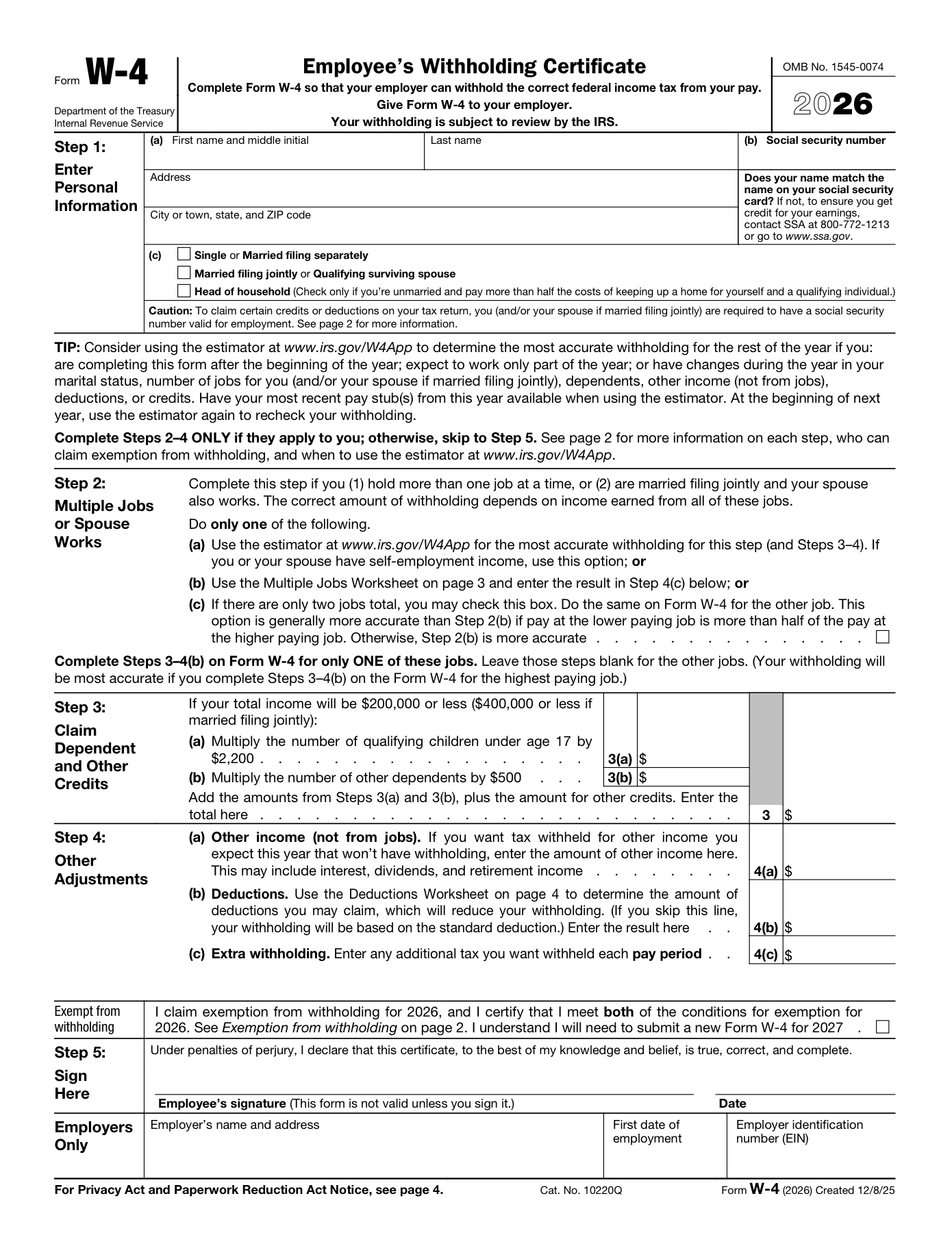
Use this visual W-4 guide to see where your name, SSN, address, filing status, withholding amounts, signature, and date belong. When you are ready, upload your federal W-4 to PDFFRAME and fill it in with the PDF editor.
This page explains how to fill a PDF visually. It is not tax advice. If you are unsure how to complete withholding choices, use IRS instructions, the IRS Tax Withholding Estimator, your employer, or a tax professional.
IRS Form W-4, Employee's Withholding Certificate, 2026.
IRS About Form W-4Use the built-in PDF viewer for native field behavior, including one digit per SSN/EIN box where the official PDF supports it. Keep the guide open while you fill, then use the PDF viewer's download button to save your completed form.
Chrome's built-in PDF viewer gives the best form-filling behavior for this IRS PDF, including segmented SSN/EIN boxes. After filling it, use the PDF viewer's download button to save your completed form.
Open W-4 PDF in browserThe image below maps 21 specific places on the IRS W-4 first page. Use the markers as a location guide, then enter your own information in the PDF editor.
Enter your first name and middle initial in the left box.
Use the name your employer should use for payroll records.
Enter your last name in the right box.
If your name does not match your Social Security card, follow the note on the form before submitting.
Enter your Social Security number.
Type the number carefully. This field is sensitive, so return the completed W-4 only through the method your employer requests.
Enter your street address, apartment, or suite number.
Use a current mailing address for payroll and employer records.
Enter the city, state, and ZIP code for the address above.
Keep this consistent with the address line.
Check this filing status if it matches your expected tax filing status.
Choose only one filing status box.
Check this box if this is the filing status you expect to use.
If both spouses work or you hold more than one job, Step 2 may also apply.
Check this only if you are unmarried and pay more than half the costs of keeping up a home for yourself and a qualifying individual.
Choose only one filing status box.
Check this box only if there are only two jobs total and you choose the Step 2(c) option on the form.
The form says the same box should be checked on the other job's Form W-4 when this option applies.
Common question: if you are married filing jointly and both spouses work, do both W-4s need Step 2(c) checked? IRS says Step 2(c) is for two jobs total and should be checked on both Forms W-4 when you use that option. Common mistakes are checking it on only one spouse's W-4, or using it when the two jobs do not have similar pay.
Reddit Step 2(c) discussionIf Step 3 applies, enter the amount for qualifying children under age 17 after multiplying by the amount shown on the form.
Use this only when your income is within the Step 3 threshold shown on the form.
Common question: do you enter the number of children or the dollar amount? Step 3 asks for calculated credit amounts, so enter the dollar amount shown by the form's multiplication instructions, not just a child count.
IRS Form W-4 PDFIf Step 3 applies, enter the amount for other dependents after multiplying by the amount shown on the form.
This is separate from the qualifying children amount on Step 3(a).
Add the amounts from Steps 3(a), 3(b), and any other credits you are claiming, then enter the total here.
If Step 3 does not apply, leave this amount blank.
Enter other income you expect this year that will not have withholding, such as interest, dividends, or retirement income.
Do not include income from jobs here.
Common question: should side income or non-wage income go here? IRS says Step 4(a) is one reason to increase withholding when you have income from sources other than jobs or self-employment that is not subject to withholding.
IRS W-4 FAQEnter the result from the deductions worksheet if you plan to claim deductions beyond the standard deduction.
If you skip this line, withholding is based on the standard deduction.
Enter any extra tax you want withheld from each paycheck.
This is also where Step 2(b) worksheet results may be entered when that option applies.
Common question: is Step 4(c) a yearly amount or a per-paycheck amount? IRS says this is the additional amount you want withheld from each paycheck, so do not enter an annual total here.
IRS W-4 FAQCheck this only if you claim exemption from withholding for the year and meet the conditions described on the form.
The form says you will need to submit a new Form W-4 for the next year if you claim exemption.
Common question: what happens if you mark exempt by mistake? The form says no federal income tax is withheld when you claim exemption, so use this only when you meet the exemption conditions.
IRS Form W-4 PDFSign the form here. The form says it is not valid unless you sign it.
Review the completed PDF before signing and returning it.
Common question: do you have to complete every step before signing? IRS says all employees must complete Step 1 and Step 5, and complete Steps 2 through 4 only when they apply.
IRS W-4 FAQEnter the date you signed the W-4.
Use the date format your employer expects.
This field is in the Employers Only section.
Employees usually should not fill this section unless the employer instructs them to.
This field is for the employer to enter the first date of employment.
Leave it blank as an employee unless your employer tells you otherwise.
This field is for the employer identification number.
Employees usually should not enter anything here.
Form W-4 is the federal withholding form employees give to their employer. Use the current IRS W-4 PDF or the copy your employer provided, fill it clearly, then return it through your employer's requested process.
Open the current IRS W-4 PDF or your employer's version before filling. Some employers use payroll systems that collect the same information online.
Use the editor to add text, check filing status, enter optional amounts only when they apply, then add your signature and date.
A completed W-4 goes to your employer or payroll system, not to the IRS. Follow the submission path your employer gives you.
The W-4 affects how much federal income tax your employer withholds from each paycheck. This page shows where fields are, but it does not decide what you should claim.
Use exempt only if you meet the conditions in the W-4 instructions. If you are unsure, use IRS guidance or ask a tax professional before checking it.
Step 4(c) is for an extra amount withheld from each paycheck. It is not an annual total.
If you owed taxes last year or your situation changed, use the IRS Tax Withholding Estimator before submitting a new W-4.
Steps 2 through 4 are optional for some employees and important for others. Review these sections carefully before signing the form.
Step 2 matters when you have more than one job, or when you are married filing jointly and both spouses work.
Step 3 uses dollar amounts, not only a count of dependents. Leave it blank if it does not apply or if your employer instructs you differently.
Step 4 can include other income, deductions, and extra withholding. The deduction-related entries are generally annual amounts.
Many first-time workers fill out a W-4 during onboarding. The same federal form is used, but some fields may not apply if the worker has one job, no dependents, and no extra withholding needs.
Complete Step 1 and Step 5, then complete Steps 2 through 4 only when they apply to your situation.
If you are unsure whether a scholarship, grant, or financial aid amount belongs on a W-4, use IRS guidance or ask your school's tax office or a tax professional.
Use the worker's own legal name, SSN, address, and signature. The employee, not the parent, is the person completing the W-4.
You can usually update your W-4 after a life, income, or withholding change. Fill out a new W-4 PDF or use your employer's payroll system, then submit it through the employer's normal process.
Consider updating after a new job, marriage, second job, dependent change, address change, or a prior-year tax balance that surprised you.
Some employers use systems such as payroll portals instead of PDF upload. Use the employer's process even if you used a PDF editor to plan your entries.
Review name, SSN, address, filing status, Steps 2 through 4, signature, and date before returning the updated W-4.
PDFFRAME opens the regular PDF editor, so you can place content directly on your own W-4 file and download the completed PDF.
Yes. You can upload a W-4 PDF to an online PDF editor, add text, check the correct boxes, sign and date the form, then return it to your employer.
Yes. Start from the current IRS federal W-4 PDF or the copy your employer provided, fill the fields in a PDF editor, then return the completed W-4 to your employer.
A W-4 can often be completed electronically when your employer accepts that workflow. Confirm your employer's rules, then make sure the signature and date are visible before returning the PDF.
No. Form W-4 is given to your employer so they can withhold federal income tax from your pay.
No. IRS FAQ says all employees complete Step 1 and Step 5. Complete Steps 2 through 4 only if they apply to your tax situation.
IRS FAQ says Step 2 matters when you hold more than one job at a time, or when you are married filing jointly and both spouses work.
Exempt means no federal income tax is withheld from your paycheck. Use it only if you meet the conditions described on the current W-4 instructions or your employer tells you how to handle it.
You can leave optional Step 3 or Step 4 lines blank when they do not apply. If your employer's system requires a number, confirm whether they expect 0 or a blank entry.
The W-4 asks for annual amounts in the deduction and worksheet areas unless the form or your employer's system says otherwise. Use the IRS instructions or estimator if you are not sure.
No. IRS FAQ describes Step 4(c) as the additional amount you want your employer to withhold from each paycheck.
Use the name that should match your payroll and Social Security records. If your name recently changed, ask your employer how they want you to complete the form.
Use the current address your employer should keep for payroll records unless your employer gives different instructions.
You can usually submit a new W-4 through your employer or payroll system. Use the IRS Tax Withholding Estimator or a tax professional to decide what to change.
No. Form W-4 tells your employer how to withhold federal income tax, Form W-2 reports wages and withholding after the year, and Form I-9 verifies employment eligibility.
No. This guide explains where to place text, checkmarks, signature, and date on a PDF. Use IRS instructions or a tax professional for withholding decisions.
Check your name, SSN, address, filing status, optional Step 2 through Step 4 entries, signature, and date. Do not fill the Employers Only section unless instructed.
Use these nearby workflows when your W-4 needs a signature, compression, or another PDF editing step.
Upload two or more PDF files, arrange them in the order you want, and download one combined PDF.
This document is processed locally. Your file is not uploaded anywhere.
This document is processed locally. Your file is not uploaded anywhere.
Add at least two PDF files to begin.
Choose one PDF, enter the maximum file size you want, and create a smaller PDF.
This document is processed locally. Your file is not uploaded anywhere.
This document is processed locally. Your file is not uploaded anywhere.
Select a PDF file and target size to begin.
Use this online PDF editor to manage PDF documents in your browser.
This document is processed locally. Your file is not uploaded anywhere.
This document is processed locally. Your file is not uploaded anywhere.
Waiting for PDF upload
Upload a PDF to start editing.
PNG or JPG signature images are supported.
Signature
Edit text, images, and pages. Upload files, set options, and download the processed result.
This document is processed locally. Your file is not uploaded anywhere.
This document is processed locally. Your file is not uploaded anywhere.
Select a file to begin.